Decide the switches first, and the folders follow
- Written by
- Ahmed Amr
- Published
Part 2 of 13 in Build a design system with a coding agent.
In this article10
Switches · The scaffold · GitHub · Rules
Loading article
Part 2 of 13 in Build a design system with a coding agent.
Switches · The scaffold · GitHub · Rules
A design system's repository is the one place its decisions live, so its shape matters before anything goes into it. The shape comes from two questions. Which layers will the tokens have, and which switches will the product need? This part answers both, builds the empty structure with a coding agent, puts it on GitHub, and sets up the habit that keeps it honest, a check that runs on every change before it is accepted.
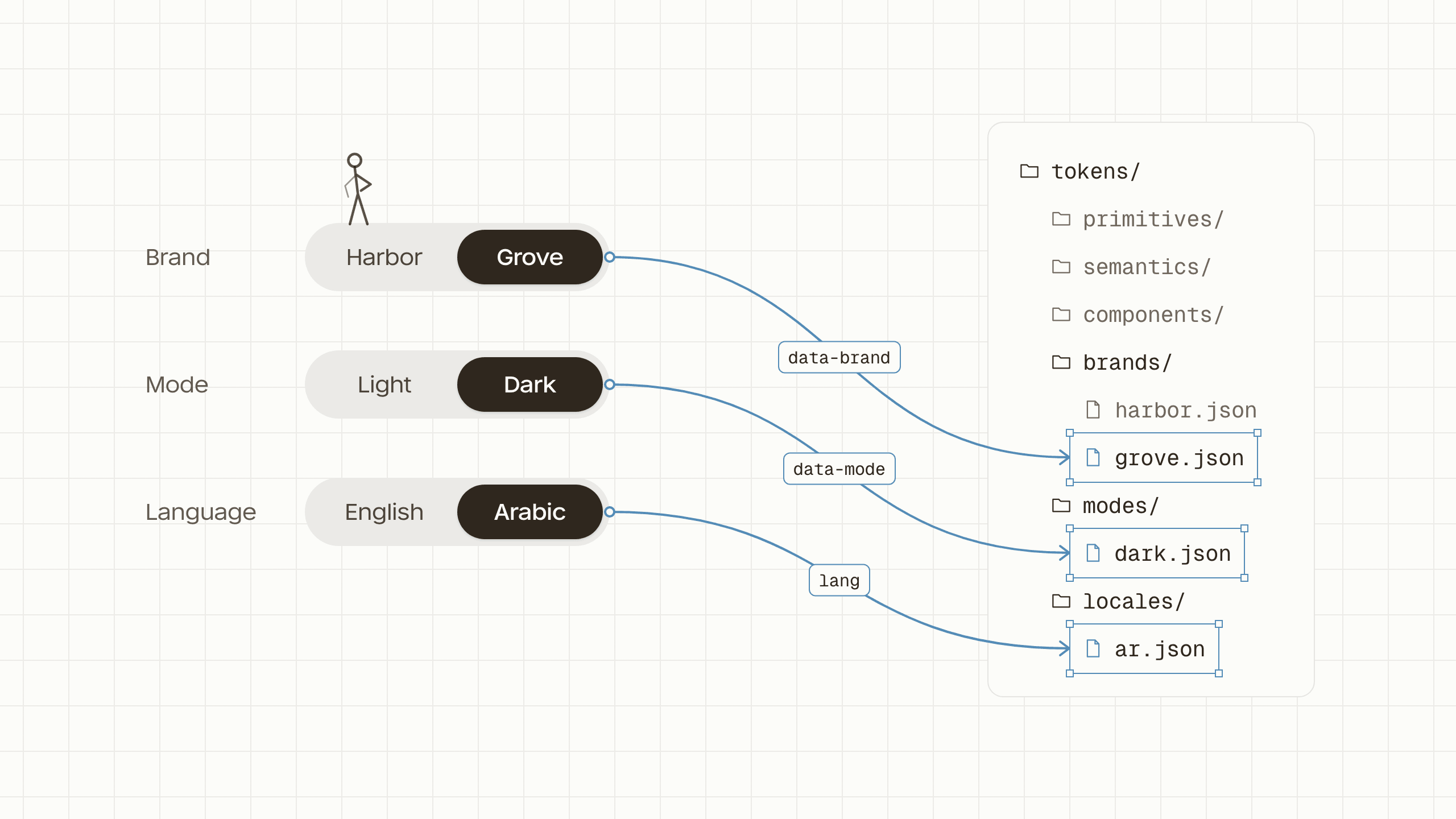
A switch is anything that changes how the whole product looks without changing what it does. A brand is a switch. So is dark mode, and so is a language whose type needs a different family. Most products have one or two, and it is worth naming them before the first token, because each one becomes a folder and an attribute, and adding one later means revisiting every file that assumed it was not there.
| Switch | What it changes | Set with | Folder |
|---|---|---|---|
| Brand | Whose product it is, its colours and sometimes its corners | data-brand | tokens/brands/ |
| Mode | Light or dark, and later high contrast | data-mode | tokens/modes/ |
| Language | The type a language needs, its family, weights and line height | lang | tokens/locales/ |
Density, roomy or compact, is a fourth that some products need, and it works the same way with a folder and an attribute of its own. The starter plans the three in the table. A product that will only ever have one brand and one mode can leave those folders out, and nothing else in the series changes.
Right to left looks like a switch and mostly is not one. When a page turns right to left, almost no value changes. The card is as wide as before, its padding is as deep and its corners are as round. What changes is which side each thing sits on.
CSS can name a side in two ways. Physical properties name a side of the screen, such as padding-left, margin-right and text-align: left. Logical properties name a side of the reading direction, such as padding-inline-start, margin-inline-end and text-align: start. Under dir="rtl", every logical property moves to the other side by itself, and so do flex rows and grids, so a row that starts on the left in English starts on the right in Arabic.
/* Right in English, wrong in Arabic */
.feature {
  padding-left: 12px;
  text-align: left;
}

/* Right in both */
.feature {
  padding-inline-start: 12px;
  text-align: start;
}
So direction gets no folder. The page sets dir next to lang, and components written with logical properties follow it. Part five builds that, along with the parts of right to left that do need decisions, such as icons that point somewhere, numbers inside an Arabic sentence, and testing both directions in every review.
The mechanics are worth seeing before part three builds them. The token layers hold one answer for every decision. The card's surface is white, its text is near-black and its button corners are 8 pixels. Each switch folder holds files that give different answers to a few of those decisions, one file per option. Harbor's file says the brand colour is blue. The dark file says the surface is near-black. The Arabic file says the type uses another family.
The page says which options apply, with attributes. data-brand="grove" on an element picks Grove's file for that element and everything inside it, data-mode="dark" picks the dark file, and the two combine because neither file answers what the other one does. Any element can carry any switch, so a dark sidebar can sit in a light page, and a client's card can sit inside an agency's own dashboard.
On the element
<divdata-brand="harbor"data-mode="light"lang="en"dir="ltr">
Harbor, light, English.
semantics/color.jsonmodes/dark.json(not picked)semantics/color.json(overridden)brands/harbor.jsonthe huesemantics/shape.jsonsemantics/type.jsonlocales/ar.json(not picked)Aadir flips it, and logical properties follow.Each row starts with the shared answer, and a switch file re-answers only the rows it mentions. Struck through is overridden, dashed is not picked.
That only works if every value stays connected to the one it came from, so that changing one answer reaches every screen that reads it. Part three shows what breaks when the build loses those connections, and the one setting that keeps them.
| Name | Light | Dark |
|---|---|---|
| surface/default | gray/0 | gray/900 |
| text/default | gray/900 | gray/50 |
Three folders hold the layers and three hold the switches. They all start empty, and having every folder from the first commits means the agent never has to decide where a file belongs. It finds the folder already there, with a README saying what goes in it.
tokens/
  primitives/   raw values, named for what they are
  semantics/    jobs, each pointing at a primitive
  components/   empty until a brand restyles one component on its own
  brands/       one file per brand, picked with data-brand
  modes/        one file per mode, picked with data-mode
  locales/      one file per language, picked with lang
scripts/
  build.js      token files in, CSS variables out
  check.js      no checks yet
.github/
  workflows/    runs the build and the check on every pull request
AGENTS.md how to work here, for people and agentsEverything from here happens in a terminal, the window where you type commands, and in the coding agent you start inside it. On a Mac that is the Terminal app, and on Windows it is Windows Terminal. Three tools need to be installed first. Node.js runs the build and the check. Git records every change, and a Mac offers to install it the first time you type git. The GitHub CLI comes in later in this part, to create the repository without leaving the terminal.
node --version
mkdir design-system-starter
cd design-system-starter
git init
node --version should print 22 or higher. The next two lines make the folder and move into it, and git init turns it into a repository, so every change from here can be recorded. Then start your coding agent in that folder, the way its own instructions say, and give it the first prompt below.
Commit after every prompt. When the agent has finished and its explanation matches what you decided, ask it to save the work as a commit.
Commit everything with a one-line message that says what changed.Each commit in the starter is one prompt followed by that one, so your history can be compared with mine, commit by commit. Once the rules file exists at the end of this part, the agent commits on a branch and opens a pull request instead.
A coding agent works in a folder of files. It reads them, writes them and runs commands, and it does what it is asked a little too readily. Give it one job per prompt and ask it to explain what it wrote, and the decisions stay yours. The first prompt sets up the project and nothing else.
Set up a new project for a design token library. I'm a designer, so after you create each file, explain it in one or two plain sentences.

- Use Node and Style Dictionary 5 to turn token files into CSS custom properties.
- Token files are JSON in the W3C Design Tokens format, in four folders under tokens/: primitives, semantics, components and brands. Leave them empty. Components stays empty until a brand needs to restyle one component on its own.
- Add two npm scripts: build, which writes dist/tokens.css, and check, which does nothing yet.
- Add a short AGENTS.md saying what this repo is. Rules come later.

Don't create any tokens yet.package.json names the project and holds its two commands. scripts/build.js hands every token file to An open-source tool that turns token files into code: CSS variables, JavaScript, iOS and Android values., an open-source tool that turns token files into code, and asks it for A named value in CSS, written --name and read with var(--name). Often called a CSS variable. in dist/tokens.css. The folders under tokens/ are the layers, still empty, and components/ is made now on purpose so every repository built from the starter has the same folders. AGENTS.md is the A Markdown file at the root of a repository that coding agents read before working in it, such as AGENTS.md., which coding agents look for at the root of a repository. The token files will follow the format the W3C Design Tokens Community Group publishes, so any tool that reads the format can read them.
The brands folder came with the scaffold. The next prompt adds the other two switches and gives each switch folder a short README, for whoever opens the folder next, person or agent, saying what goes in it and which attribute picks its files.
Add empty folders for the two other switches this system will have: tokens/modes/ for light and dark, and tokens/locales/ for languages that need different type. Give each switch folder, brands included, a short README saying what goes in it and which attribute picks its files: data-brand, data-mode or lang. Say in the locales README that direction is not a token switch. Don't create any tokens.The locales README also says what does not belong there. Direction is the decision most likely to end up in the wrong place, as a pair of left and right tokens for every spacing value, and one sentence in the folder where someone would put them heads that off.
GitHub keeps the repository somewhere other than your laptop, records every change with who made it and why, and lets a change be read before it is accepted. Three words cover most of what a designer needs. A commit is a saved change with a note. A branch is a line of changes kept apart from the main one until it is ready. A pull request asks to bring a branch into the main line, where the change can be read, discussed and checked.
The agent can create the repository with GitHub's command-line tool, gh, as long as it is installed and you have signed in once with gh auth login, which opens GitHub in the browser to confirm it is you. If you have not, the prompt has the agent tell you that one command and stop there. Creating the repository in the browser and pushing to it works just as well.
Create a public GitHub repository called design-system-starter with the GitHub CLI, connect this folder to it, and push the main branch. Explain each command in one sentence before you run it. If I'm not signed in to the GitHub CLI, tell me the one command to sign in and stop.From here on, no change goes straight onto the main branch. The agent works on a branch and opens a pull request, and a workflow in GitHub Actions runs the build and the check on it. With one setting in the repository, a pull request whose check fails cannot be merged, so a rule broken by a tired person or a confident agent is caught before it reaches anyone.
Add a GitHub Actions workflow that runs npm ci, npm run build and npm run check on every pull request and on every push to main, using the Node version in .nvmrc. Then tell me how to set up the repository so a pull request can't be merged until this check passes.name: Check
on:
pull_request:
push:
branches: [main]
jobs:
check:
runs-on: ubuntu-latest
steps:
- uses: actions/checkout@v7
- uses: actions/setup-node@v7
with:
node-version-file: .nvmrc
- run: npm ci
- run: npm run build
- run: npm run checkGitHub calls the setting a ruleset. Open the repository's Settings, choose Rulesets in the sidebar and add a new branch ruleset. Set its enforcement status to Active, because a new ruleset starts disabled, target the default branch, and turn on Require a pull request before merging and Require status checks to pass before merging, with the check called check. The check is easiest to find in that list once it has run, so the first pull request is also how you finish setting it up. Rulesets are free on public repositories, and a private repository needs a paid plan.
The check does nothing yet. Every part from here adds to it, so by the time the system is in use, the workflow is what says whether a change is safe to merge.
The rules file grows with the system. Its first version has no rules about tokens, because there are none yet. It says how to work in the repository, so every session starts the same way, whoever or whatever is doing the work.
Rewrite AGENTS.md with how to work in this repository. Keep it short:
- one job per prompt, and ask before starting a second
- work on a branch and open a pull request; never push to main
- run npm run build and npm run check before saying you're done
- after writing a file, explain it in two sentences a designer would follow
- when a rule here is unclear, ask instead of guessing
- where things go: the layer folders, the switch folders and the two scriptsMany coding agents look for AGENTS.md at the root of a repository. An agent that looks for a file under its own name can be given that file with one line in it pointing here, so every tool reads the same rules.
From the next part on, every prompt ends with the agent opening a pull request. You read its explanation and the change on GitHub, the check runs, and you merge when both look right. That loop is the whole review process, and it is the same one a team of people uses.
Every decision the series makes from here goes into this file and into the check together. Part three adds the layers and how semantic colours are named, parts four and five the switches, and part seven the full naming grammar, each with the check that enforces it.
At part-2-setup the starter has six empty folders, a build that writes an empty file, a check with nothing to check yet, a workflow that runs both, and a rules file. Part three fills the layers with tokens.